Repeatable inputs.
Bring parameterised inputs,  PatGen patterns and design specifications into a structured workflow that can be saved and revisited.


TowGeom
BUILT BY ENGINEERS. FOR ENGINEERS.
Tower geometry, clearance visualisation and engineering outputs. Bring a more connected approach to your design workflow.
01 / A CONNECTED WORKFLOW
Explore the workflow, then compare the Basic and Intermediate plans below. External integrations require the relevant software and configuration.
01 / Geometry
Define slopes, panels, crossarms and peaks. Reuse patterns and project specifications to build a consistent tower geometry.
02 / Clearance · Intermediate
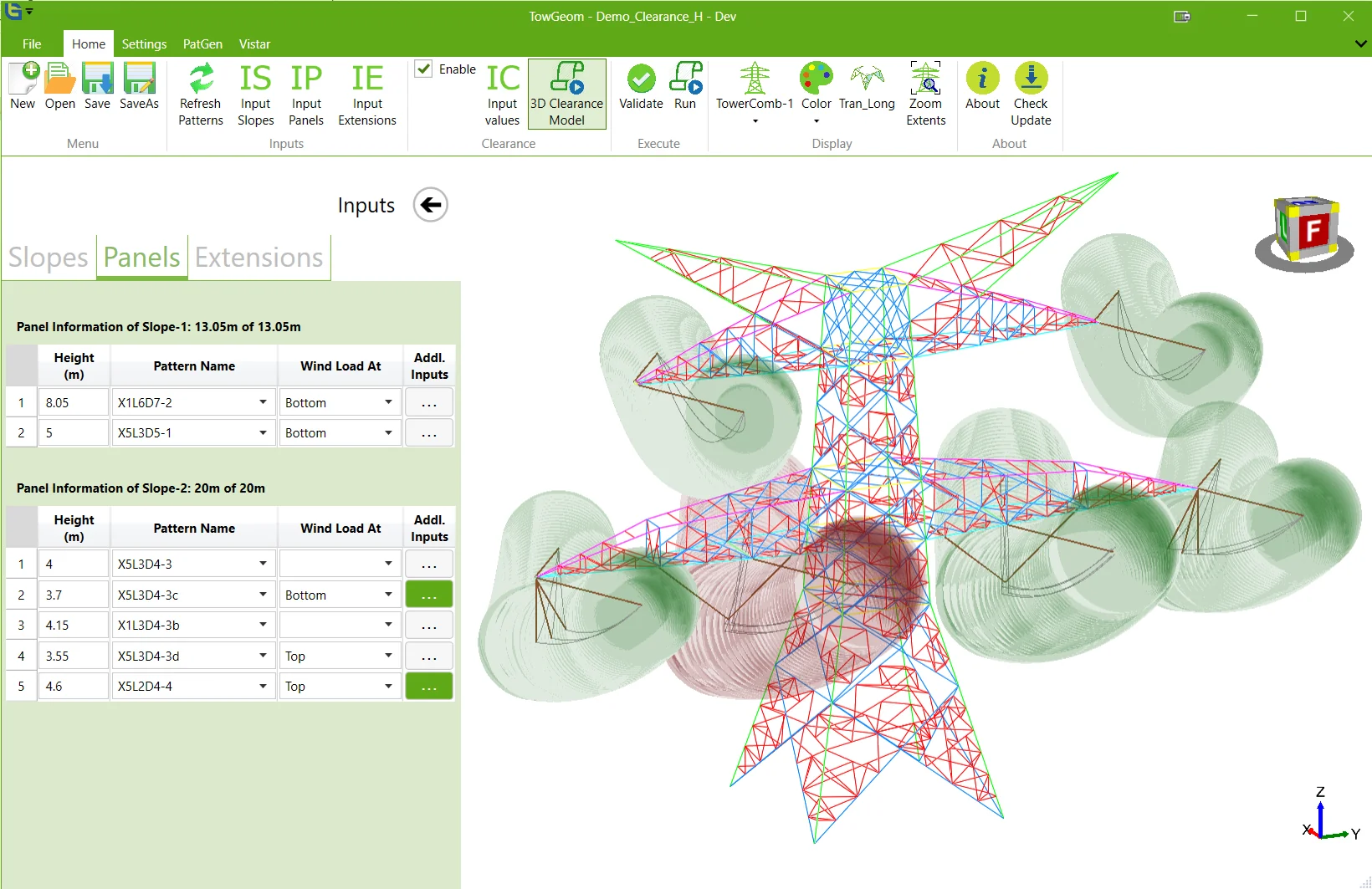
With the Intermediate plan, explore conductor and insulator arrangements alongside the tower. Visualise clearance envelopes for suspension and tension configurations.
03 / Outputs
Prepare geometry outputs and design data for your selected workflow. Consult the manual for prerequisites and external software requirements.
02 / BUILT FOR THE DETAIL
Bring parameterised inputs, PatGen patterns and design specifications into a structured workflow that can be saved and revisited.
Inspect your tower geometry in the viewer. The Intermediate plan adds clearance visualisation and tower combinations.
Prepare geometry exports, design drawings, wind-load calculations and panel-weight data for your engineering workflow.
TOWGEOM CUSTOMERS
A selection of customers benefiting from TowGeom in their tower engineering workflows.
 KEC International Limited
 POWERGRID
 Sterlite Power
 L&T Construction — Power Transmission & Distribution
 Skipper Limited
 Adani
Adani Arvensis
 Valmont
 Bajel
Bajel Locweld
 MİTAŞ
MİTAŞ Jyoti Structures Limited
 TPEC — Takalkar Power Engineers & Consultants Pvt. Ltd.
 SPACE
SPACE Fichtner India
 Scan to watch
 DEGI TRANS · VIDEO
Watch the Degi Trans video introducing the TowGeom 3D graphic viewer.
Watch on YouTube03 / LICENCE PLANS
Two plans, with a clear distinction between the included modules.
3D tower modelling, parameterised inputs, PatGen and design libraries, geometry exports, drawings, wind-load calculations and panel weights.
All Basic features, plus the Clearance module and Extension (Tower Combinations) module.
| TowGeom features | Basic | Intermediate |
|---|---|---|
| 3D tower modelling with redundants | Included | Included |
| Parameterised tower geometry inputs | Included | Included |
| PatGen and tower pattern library | Included | Included |
| Design specification library | Included | Included |
| Geometry exports and PLS TOWER input data | Included | Included |
| 2D and 3D design drawing outputs | Included | Included |
| Body wind area and load calculations | Included | Included |
| Panel-wise weight calculations | Included | Included |
| Clearance module | Not included | Included |
| Extension (Tower Combinations) module | Not included | Included |
Pricing is available on enquiry. Talk to our software team about the right plan for your work.
Discuss plans & pricing04 / EXPERIENCE TOWGEOM
Explore all Intermediate features with a 15-day Windows trial, including Clearance and Extension (Tower Combinations).
Install TowGeom and request a trial licence in the application. Activation is automatic; you do not need to contact us.
Arrange a guided demonstrationDownload the public TowGeom trial installer.
Download 15-day trialTrial version 3.6.07
All Intermediate features, including Clearance and Extension (Tower Combinations). Install TowGeom and request a trial licence inside the application. Activation is automatic; there is no need to contact us.
PDF · 123 pages · 8.1 MB
Manual 1.1.1 · Covers TowGeom 3.6.08.0; screens and release-specific details may differ from installer 3.6.07.
05 / GOOD QUESTIONS
TowGeom supports 3D tower modelling, parameterised inputs, PatGen pattern libraries, geometry exports, drawings and design data. The Intermediate plan adds Clearance and Extension (Tower Combinations). Modelling and visualisation form part of an engineering workflow and do not replace the engineer’s independent checks.
No. TowGeom is Windows desktop software. This website introduces the product, provides resources and connects you with the team.
Basic covers the modelling, library, export and design-data features listed in the comparison. Intermediate includes those features plus the Clearance module and Extension (Tower Combinations) module. Compare the complete feature list.
The trial lasts 15 days and includes all Intermediate features.
Install TowGeom, then request a trial licence from within the application. Your trial activates automatically after the licence request, so you do not need to contact us to activate it.
The 15-day trial provides the complete Intermediate feature set, including the Clearance module and Extension (Tower Combinations) module. The linked manual covers a different release, so screens and release-specific details may differ.
Contact our software team with your company, intended workflows and number of users. The team will confirm Basic or Intermediate pricing, licence terms and support.